
| 일 | 월 | 화 | 수 | 목 | 금 | 토 |
|---|---|---|---|---|---|---|
| 1 | 2 | 3 | 4 | |||
| 5 | 6 | 7 | 8 | 9 | 10 | 11 |
| 12 | 13 | 14 | 15 | 16 | 17 | 18 |
| 19 | 20 | 21 | 22 | 23 | 24 | 25 |
| 26 | 27 | 28 | 29 | 30 |
- re-id
- 미니프로젝트
- 2주차
- github
- 장고
- 알고리즘
- 1주차
- 정보처리기사
- Commpot
- vscode
- WebSocket
- sql
- js
- poetry
- channels
- Git
- 프로그래머스
- 가상환경
- 마스킹
- resnet50
- 개발일지
- 채팅
- REDIS
- 정보처리기사실기
- WHERE절
- Class
- 파이썬
- 프로젝트
- 백준
- WIL
- Today
- Total
개발일기
[channels] 실시간 단체채팅방 구현하기(2) 본문
채널레이어 세팅하기
# settings.py

env = Env()

# django channels layer
if "CHANNEL_LAYER_REDIS_URL" in env:
    channel_layer_redis = env.db_url("CHANNEL_LAYER_REDIS_URL")
    CHANNEL_LAYERS = {
        "default": {
            "BACKEND": "channels_redis.core.RedisChannelLayer",
            "CONFIG": {
                "hosts": [
                    {
                        "host": channel_layer_redis["HOST"],
                        "port": channel_layer_redis.get("PORT") or 6379,
                        "password": channel_layer_redis["PASSWORD"],
                    }
                ]
            },
        }
    }
채널과 그룹, 채널레이어
- 채널
- Consumer Instance 내부에서 생성
- 하나의 연결마다 Consumer 클래스의 Instance가 자동 생성되며, 각 Consumer Instance마다 고유한 채널명을 가짐
- 그 채널을 통해 Consumer Instance는 채널 레이어와 통신 - 그룹
- 여러 Consumer Instance를 묶는 논리적인 묶음
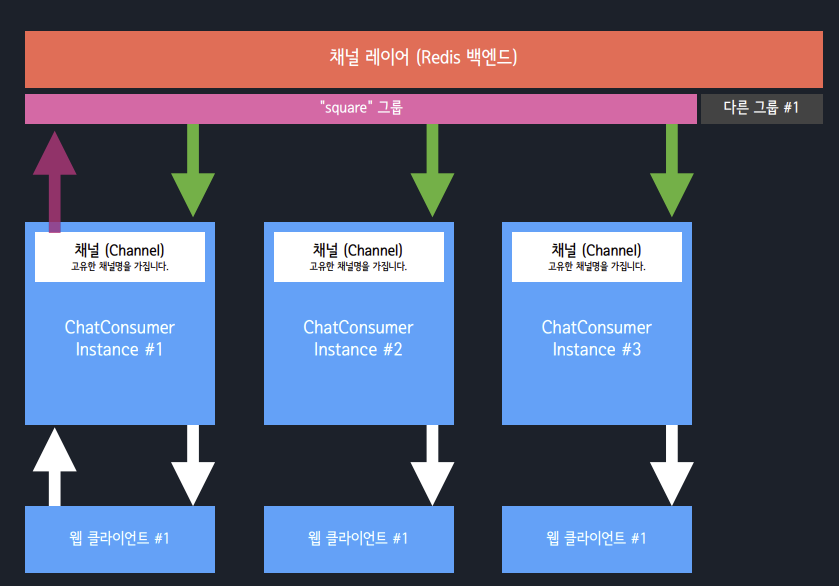
- 채널레이어
- 서로 다른 프로세스 간에 메세지를 전달할 때, 중개자 역할
- 주로 Consumer Instances에서 메세지를 소비/발행
- 장고 뷰/모델, Celery Tasks를 비롯한 모든 장고 영역에서 메세지 발행할 수 있다.
asgi.py
ASGI_APPLICATION = "프로젝트 app 이름.asgi.application"import os
import django
os.environ.setdefault('DJANGO_SETTINGS_MODULE', 'config.settings')
django.setup()
from channels.routing import ProtocolTypeRouter, URLRouter
from django.core.asgi import get_asgi_application
import chat.routing
from .middleware import JwtAuthMiddlewareStack
# 1단계) 프로토콜 타입에 의한 라우팅
application = ProtocolTypeRouter({
# http 요청일 때 처리
'http': get_asgi_application(),
# websocket 요청일 때 처리, 2단계) 요청 URL에 의한 라우팅
'websocket': JwtAuthMiddlewareStack(
URLRouter(
chat.routing.websocket_urlpatterns
)
)
})내 경우에는 user_id로 유저정보를 판별 및 저장하기 위해서 커스텀미들웨어를 만들어 사용했다.
(원래는 token정보를 받았었는데, url에 token정보가 보이는 것은 보안상 위험할 수도 있다는 튜터님의 의견을 반영해 user_id로 변경하였다.)
# middleware.py

@database_sync_to_async
def get_user(user_id):
    try:
        user = get_user_model().objects.get(id=user_id)
        return user
    except User.DoesNotExist:
        return AnonymousUser()


class JwtAuthMiddleware(BaseMiddleware):
    def __init__(self, inner):
        self.inner = inner

    async def __call__(self, scope, receive, send):
        close_old_connections()
        try:
        # url에서 user_id 가져오기
            user_id = parse_qs(scope["query_string"].decode("utf8"))["id"][0]
        except KeyError:
            scope["user"] = AnonymousUser()
            return await super().__call__(scope, receive, send)

        if user_id:
            scope["user"] = await get_user(user_id=user_id)
        else:
            scope["user"] = AnonymousUser()
        return await super().__call__(scope, receive, send)


def JwtAuthMiddlewareStack(inner):
    return JwtAuthMiddleware(AuthMiddlewareStack(inner))
    # AuthMiddlewareStack: 현재 인증된 사용자에 대한 참조로 scope를 결정
scope는 현재 요청의 세부내역이 담긴 dict를 의미한다. user_id가 존재하면 scope의 user에 해당 user정보를 담는다.
@database_sync_to_async:
소비자를 비동기식으로 작성하게 되면 요청을 처리할 때, 추가적인 쓰레드를 생성하지 않는다. 즉 성능 개션을 불러올 수 있다. 실시간 채팅같은 경우에는 성능이 굉장히 중요한 요소이기 때문에 이 과정이 필요하다.
Django ORM은 동기식 코드이기 때문에 소켓에서 통신만 비동기로 처리해보아야 의미가 없다.
DB는 동기식으로 처리할 것이기 때문에 코드를 비동기로 짜도 동기로 동작할 수 있다.
따라서 @database_sync_to_async를 사용해 비동기 처리를 해준다.
AuthMiddlewareStack:
현재 인증된 사용자에 대한 참조로 scope를 결정한다. 이는 Django에서 현재 인증된 사용자의 view 함수에서 request 요청을 결정하는 AuthenticationMiddleware와 유사한 방식이며, 그 결과 URLRouter로 연결된다.
라우팅과 consumer.py
#routing.py
from django.urls import path
from chat import consumers

websocket_urlpatterns = [
    # 로컬 url
    path("ws/chat/<str:room_id>/", consumers.ChatConsumer.as_asgi()),
    # 배포 url
    # path("chat/<str:room_id>/", consumers.ChatConsumer.as_asgi()),
]
우리 프로젝트의 경우 로컬환경과 배포환경에서의 url주소가 서로 달랐다.
(이 문제때문에 배포에서 상당히 애를 먹었다.. 401에러가 뜨는데, 이유를 못 찾아서 한참을 고생했지만, 원인은 경로에 있었다!! 401에러라고 인증에만 한참 디버깅을 했던 나 자신.. 며칠을 애써도 문제가 보이지 않는다면 그것은 다른 원인일 수 있다 ^^)
# consumers.py

# utils
import json
from datetime import datetime
from rest_framework.response import Response
from rest_framework import status

# channels
from channels.generic.websocket import AsyncWebsocketConsumer
from channels.db import database_sync_to_async

# models, serializers
from users.models import User
from chat.models import RoomMessage, ChatRoom, RoomChatParticipant

class ChatConsumer(AsyncWebsocketConsumer):

    async def connect(self):
        user = self.scope.get('user')
        room_id = self.scope["url_route"]["kwargs"]["room_id"]
        room = await self.get_room_obj(room_id)

        if (user.id != None) and (room != ""):
            self.room_name = self.scope['url_route']['kwargs']['room_id']
            self.room_group_name = 'chat_%s' % self.room_name
        else:
            self.close()

        await self.channel_layer.group_add(
            self.room_group_name,
            self.channel_name
        )

        is_first = await self.enter_or_out_room(user.id, room_id, is_enter = True)

        if is_first:
            response = {
                'response_type' : "enter",
                'sender_name': user.nickname,
                'user_id' : user.id,
            }
            await self.channel_layer.group_send(
                self.room_group_name,
              {
                  'type': 'chat_message',
                  'response': json.dumps(response)
              }
            )

        await self.accept()


    async def disconnect(self, close_code):
        # Leave room group
        await self.channel_layer.group_discard(
            self.room_group_name,
            self.channel_name
        )

        if self.scope.get('user').is_authenticated:
            user = self.scope.get('user')
            room_id = self.scope['url_route']['kwargs']['room_id']
            _ = await self.enter_or_out_room(user.id , room_id, is_enter = False)

        response = {
            'response_type' : "out",
            'user_id' : user.id,
            'sender_name': user.nickname,
          }

        await self.channel_layer.group_send(
            self.room_group_name,
            {
                'type': 'chat_message',
                'response': json.dumps(response)

            }
          )

    # Receive message from WebSocket
    async def receive(self, text_data):

        text_data_json = json.loads(text_data)
        room_id = text_data_json.get('room_id', '')
        user_id = text_data_json.get('user_id', '')

        # alert메시지 전송
        if '' in [user_id, room_id]:
          return await self.channel_layer.group_send(
              f'alram_{user_id}',
              {
                  'type': 'chat_message',
                  'response': json.dumps({'response_type' : 'alert', 'message' : '올바르지 않은 접근'})

              }
            )


        user = await self.get_user_obj(user_id)
        room = await self.get_room_obj(room_id)

        if user.profile_image:
            profile_image = user.profile_image.url
        else:
            profile_image = None


        message = text_data_json['message']

        await self.create_message_obj(user_id, message, room_id)

        response = {
          'response_type' : "message",
          'message': message,
          'sender': user.id,
          'sender_name': user.nickname,
          'room_id': room.id,
          'profile':profile_image,
          'time': await self.get_time(),
        }

        # Send message to room group
        await self.channel_layer.group_send(
            self.room_group_name,
            {
                'type': 'chat_message',
                'response': json.dumps(response)
            }
        )


    # Receive message from room group
    async def chat_message(self, event):
        await self.send(text_data=event['response'])


    async def get_time(self):
    # 시간 커스텀

        now = datetime.now()
        am_pm = now.strftime('%p')
        now_time = now.strftime('%I:%M')

        if am_pm == 'AM':
          now_time = f"오전 {now_time}"
        else:
          now_time = f"오후 {now_time}"

        return now_time

    @database_sync_to_async
    def get_user_obj(self, user_id):
    # 유저정보

        try:
            obj = User.objects.get(pk = user_id)
        except User.DoesNotExist:
            return False

        return obj

    @database_sync_to_async
    def get_room_obj(self, room_id):
    # 채팅방 정보
        try:
            obj=ChatRoom.objects.get(pk=room_id)
        except ChatRoom.DoesNotExist:
            return False

        return obj

    @database_sync_to_async
    def create_message_obj(self, user_id, message, room_id):
    # 메세지 db에 저장
        obj = RoomMessage.objects.create(author_id=user_id, content=message, room_id = room_id)
        obj.save()

        return obj

    @database_sync_to_async
    def enter_or_out_room(self, user_id:int, room_id:int, is_enter:bool):
      """
      출/입 에 따라 참여자를 제거/생성|가져오기 를 끝내고 참여자를 반환
      """
      participant, is_first = RoomChatParticipant.objects.get_or_create(room_id = room_id, user_id = user_id)

      if is_enter:
        return is_first
      else:
        participant.delete()
        return is_first

class AlarmConsumer(AsyncWebsocketConsumer):

    async def connect(self):

        if self.scope.get('user').is_authenticated:
            user = self.scope.get('user')
            self.alarm_name = 'alarm_%s' % user.id

            # 해당 로그인 유저 그룹 생성 추가
            await self.channel_layer.group_add(
                self.alarm_name,
                self.channel_name
            )
        else:
            Response(status=status.HTTP_401_UNAUTHORIZED)

        await self.accept()

    async def disconnect(self, close_code):
        # Leave room group
        await self.channel_layer.group_discard(
            self.alarm_name,
            self.channel_name
        )

    async def chat_message(self, event):
        await self.send(text_data=event['response'])
AsyncWebsocketConsumer
- WebsocketConsumer의 비동기버전
- 웹소켓 클라이언트와 통신 시에 직접 json 인코딩/디코딩 필요
- connect() :
웹소켓 클라이언트와 연결 시점에 호출된다. 연결 수락 여부를 결정하기 위해 accept/close 메서드를 호출한다. - accept() : connect 메서드 내에서 연결을 수락할 때 호출한다. 연결 거부는 close 호출한다.
- close(code=None) : 웹소켓 클라이언트와의 현 연결을 끊고자 할 때 호출한다.
- disconnect(code) : 웹소켓 클라이언트와 연결이 끊어졌을 때 호출된다.
- receive(text_data=None, bytes_data=None) : 웹소켓 클라이언트로부터 메세지를 받았을 때 호출
- send(text_data=None, bytes_data=None, close=False) : 웹소켓 클라이언트에 메세지를 보낼 때 호출
channel_layer.group_add(그룹명, 채널명)
- 수동으로 지정 그룹에 지정 채널을 추가한다.
- 그룹명이 고정되지 않은 경우에 유용. (ex: "chat-django")
channel_layer.group_discard(그룹명, 채널명)
- 수동으로 지정 그룹에서 지정 채널을 제거한다.
- group_add를 수행한 Consumer Instance는 제거되기 전에, 필히 group_discard를 수행해야함
channel_layer.send(채널명, 메세지)
- 채널명을 알고 있는 장고 어떤 영역에서든 지정 Consumer Instance에 메세지를 보낼 수 있다.
다음 글에서는 model, view에 대해서 살펴보겠다!!
[다음글로 바로 가기 ->]
2023.06.23 - [Project Portfolio] - [channels] 실시간 단체채팅방 구현하기 (3)
'Project Portfolio' 카테고리의 다른 글
| 부트스트랩 툴팁 커스터마이징) 너비(크기)랑 폰트 조절, 줄바꿈, 위치 조절 (0) | 2023.06.28 |
|---|---|
| [channels] 실시간 단체채팅방 구현하기 (3) (0) | 2023.06.23 |
| [channels] 실시간 단체채팅방 구현하기(1) (0) | 2023.06.19 |
| [구독 해지예약 및 취소, 구독 재신청 구현] (0) | 2023.06.10 |
| [결제] KG이니시스 결제 구현하기 (feat. 포인트충전) (0) | 2023.06.09 |


