
| 일 | 월 | 화 | 수 | 목 | 금 | 토 |
|---|---|---|---|---|---|---|
| 1 | 2 | 3 | ||||
| 4 | 5 | 6 | 7 | 8 | 9 | 10 |
| 11 | 12 | 13 | 14 | 15 | 16 | 17 |
| 18 | 19 | 20 | 21 | 22 | 23 | 24 |
| 25 | 26 | 27 | 28 | 29 | 30 | 31 |
- Commpot
- 정보처리기사실기
- sql
- re-id
- vscode
- channels
- Class
- 2주차
- 알고리즘
- 파이썬
- REDIS
- 개발일지
- 백준
- WHERE절
- 마스킹
- github
- 1주차
- 장고
- 정보처리기사
- WIL
- poetry
- Git
- 미니프로젝트
- 채팅
- resnet50
- 가상환경
- js
- 프로그래머스
- 프로젝트
- WebSocket
- Today
- Total
개발일기
SQL 2주차 Join, Union 연습하기 본문
Join 문법
- 서로 다른 두 테이블을 연결
- 두 테이블의 공통된 정보 (key값)를 기준으로 테이블을 연결해서 하나의 테이블처럼 보는 것
- join 실행 순서: from -> join -> select
- join 실행 순서2: from -> join -> where -> group by -> select -> order by
- join의 종류: left join, inner join
- left join: 꽉찬 데이터, 비어있는 데이터 존재함
- left join: 어디에, 뭐를 붙일건지, 순서가 매우 중요함!!

- inner join: key값을 두 테이블에서 모두 가지고 있는 데이터만 출력

예1) 유저 데이터로 Left Join 이해해보기
select * from users u
left join point_users p
on u.user_id = p.user_id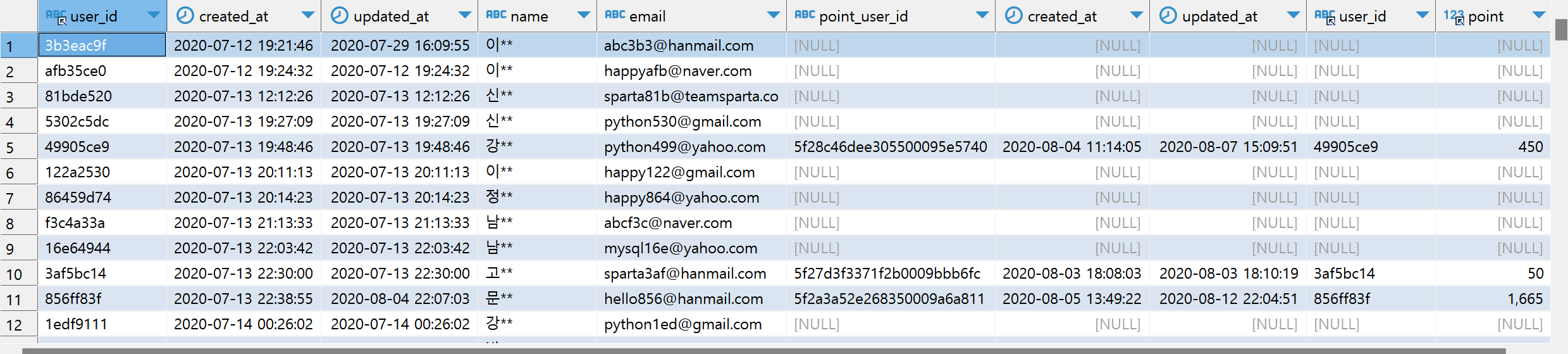
예2) 유저 데이터로 Inner Join 이해해보기
select * from users u
inner join point_users pu
on u.user_id = pu.user_id
예3) checkins 테이블에 users 테이블 연결해보기 (Inner Join 사용)
select * from checkins c
inner join users u
on c.user_id  = u.user_id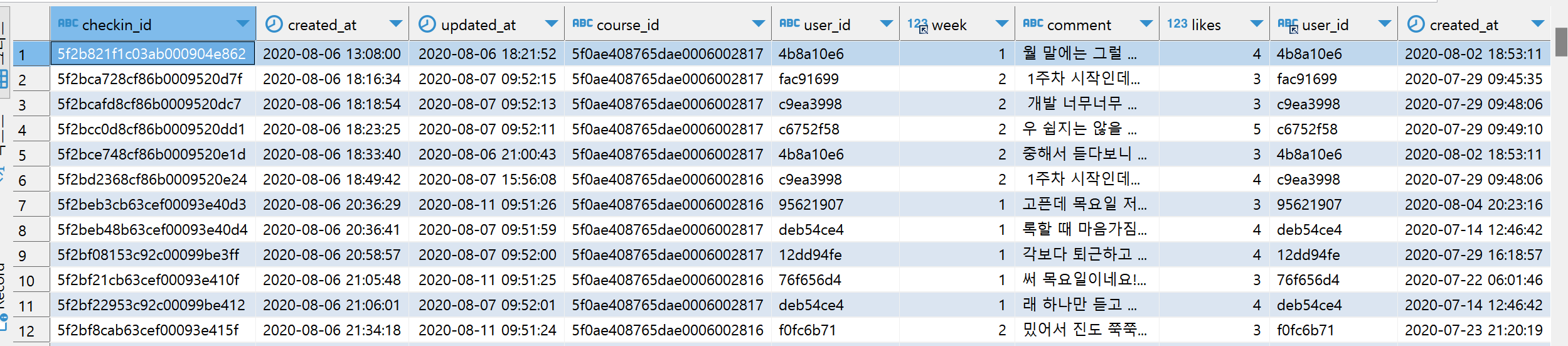
예4) '오늘의 다짐' 정보에 과목 정보를 연결해 과목별 '오늘의 다짐' 갯수를 세어보자!
select c2.title, count(*) as cnt from checkins c
inner join courses c2
on c.course_id = c2.course_id
group by c2.title
예5) 유저의 포인트 정보가 담긴 테이블에 유저 정보를 연결해서, 많은 포인트를 얻은 순서대로 유저의 데이터를 뽑아보자!
select p.user_id , u.name, u.email, p.point from point_users p
inner join users u
on p.user_id = u.user_id
order by p.point desc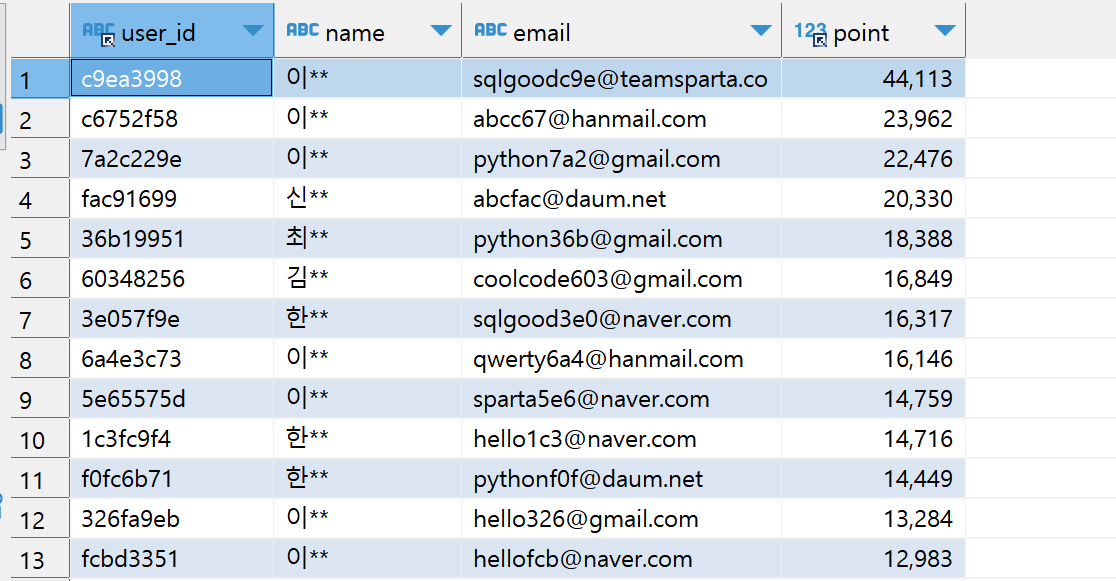
예6) 주문 정보에 유저 정보를 연결해 네이버 이메일을 사용하는 유저 중, 성씨별 주문건수를 세어보자!
select u.name, u.email, count(*) as cnt from orders o
inner join users u
on o.user_id = u.user_id
where o.email like '%naver.com'
group by u.name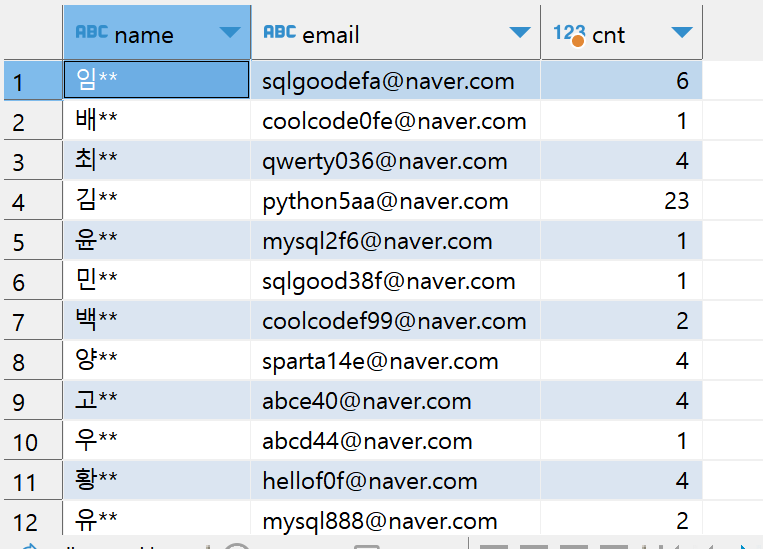
자 그럼 이제 지금까지 내용을 가지고, 퀴즈를 풀어보자!
퀴즈1) 결제 수단 별 유저 포인트의 평균값 구해보기
select o.payment_method, round(avg(p.point),2) as avg_pt from point_users p
inner join orders o
on p.user_id = o.user_id
group by o.payment_method
퀴즈2) 결제하고 시작하지 않은 유저들을 성씨별로 세어보기
select u.name, count(*) as cnt_name from enrolleds e
inner join users u
on e.user_id =u.user_id
where e.is_registered = 0
group by u.name
order by cnt_name desc
퀴즈3) 웹개발, 앱개발 종합반의 week 별 체크인 수를 세어보기
select c.title , c2.week, count(*) as cnt from courses c
inner join checkins c2
on c.course_id = c2.course_id
group by c.title, c2.week
order by c.title, c2.week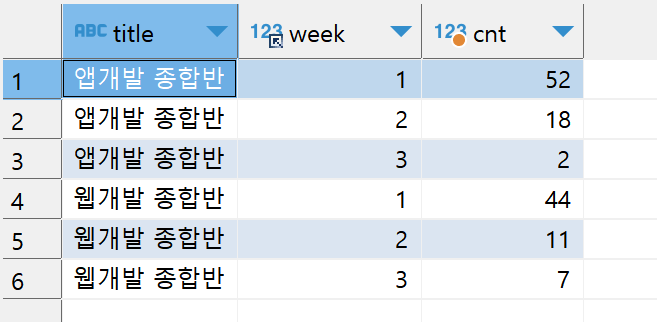
퀴즈5) 웹개발, 앱개발 종합반의 week 별 8월 1일 이후에 구매한 고객들만 뽑아오기
select c.title, c2.week, count(*) as cnt from courses c
inner join checkins c2
on c.course_id =c2.course_id
inner join orders o
on c2.user_id =o.user_id
where o.created_at >='2020-08-01'
group by c.title, c2.week
order by c.title, c2.week
퀴즈6) 유저 중에, 포인트가 없는 사람(=즉, 시작하지 않은 사람들)의 통계내기
select u.name, count(*) from users u
left join point_users pu
on u.user_id =pu.user_id
where pu.point_user_id  is NULL
group by u.name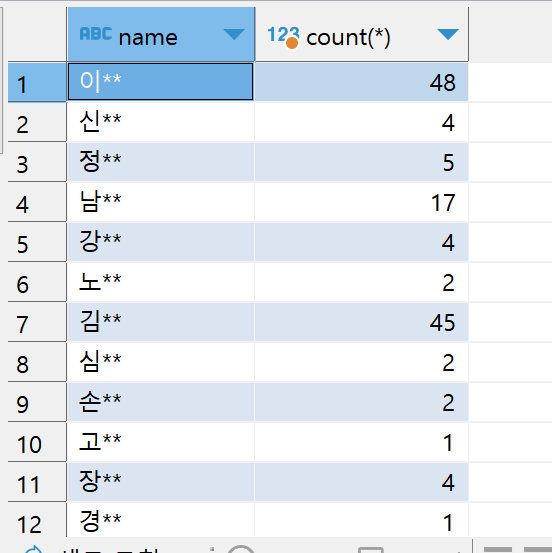
반대로, 유저 중에 포인트가 있는 사람의 통계를 낼 때는, is not NULL 이용하기
퀴즈7) 7월10일 ~ 7월19일에 가입한 고객 중, 포인트를 가진 고객의 숫자, 그리고 전체 숫자, 그리고 비율 보기
select count(pu.point_user_id) as pnt_user_cnt,
	count(u.user_id) as tot_user_cnt,
	round(count(pu.point_user_id)/count(u.user_id),2) as ratio
	from users u
left join point_users pu
on u.user_id = pu.user_id
where u.created_at BETWEEN '2020-07-10' and '2020-07-20'
이때, 다음과 같이 코드를 바꾸면, 이런 문제가 발생하므로 주의하자!
select count(pu.point_user_id is not NULL) as pnt_user_cnt,
	count(u.user_id) as tot_user_cnt,
	round(count(pu.point_user_id)/count(u.user_id),2) as ratio
	from users u
left join point_users pu
on u.user_id = pu.user_id
where u.created_at BETWEEN '2020-07-10' and '2020-07-20'
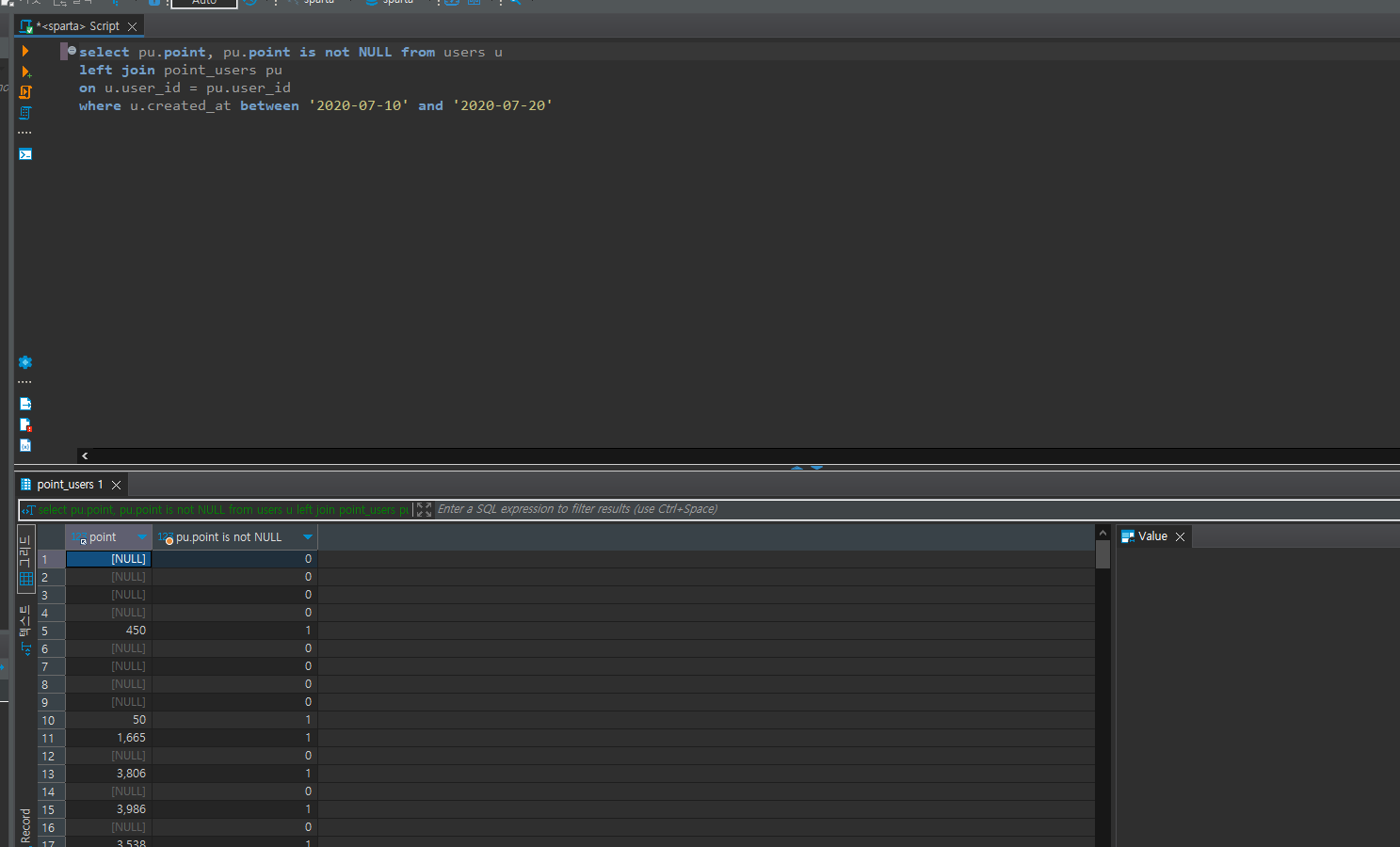
이렇게 되는 이유: count(pu.point_user_id is not NULL)을 해버리면,
- count를 빼고 값을 모두 출력했을때의 결과: pu.point의 경우 값이 없을경우 NULL, 데이터가 있으면 그에 맞는 값을 보여줌
- is not NULL을 추가하면 NULL->0, 데이터가 있으면 ->1 로 산출함
- 따라서 count를 씌우면 전자는 NULL값을 제외하기 때문에 82가 나온것이고,
- 후자는 NULL값이 0으로 대체되어 'count가 읽을 수 있는 상태'가 되었기 때문에 NULL값을 제외 못하고 전체 갯수를 출력하게 됨
Union 문법 (Union all 사용!)
- 두 개의 결과물을 합치기

예1) 웹개발, 앱개발 종합반의 week 별 8월 1일 이전, 이후에 구매한 고객들만 뽑아오기
(
	select '7월' as month, c.title, c2.week, count(*) as cnt from courses c
	inner join checkins c2
	on c.course_id =c2.course_id
	inner join orders o
	on c2.user_id =o.user_id
	where o.created_at <'2020-08-01'
	group by c.title, c2.week)
union all
(
	select '8월' as month, c.title, c2.week, count(*) as cnt from courses c
	inner join checkins c2
	on c.course_id =c2.course_id
	inner join orders o
	on c2.user_id =o.user_id
	where o.created_at >='2020-08-01'
	group by c.title, c2.week);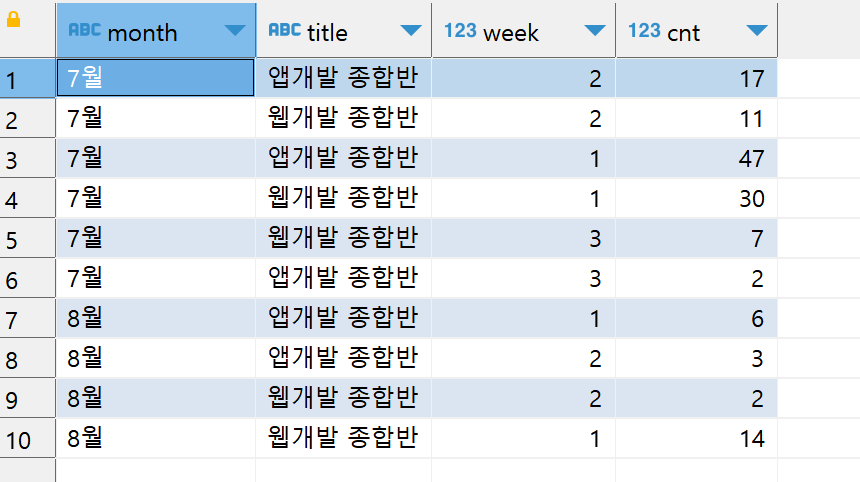
서로 다른 테이블의 데이터 또는 결과물을 합칠 수 있는 join과 union~
이제는 하나의 테이블의 데이터뿐 아니라 여러 테이블의 데이터를 정리할 수 있다!
'오늘의 공부일기 > SQL 공부일기' 카테고리의 다른 글
| SQL 2주차 쿼리문 더 깔끔하게 정리하기 (0) | 2023.03.10 |
|---|---|
| SQL 2주차 Subquery 연습하기 (0) | 2023.03.02 |
| SQL 1주차 Group by, Order by 문법 연습 (0) | 2023.03.01 |
| SQL 1주차 select문, where절 연습 (0) | 2023.03.01 |
| SQL 1주차 데이터베이스, SQL 개념 간단정리 (0) | 2023.03.01 |


