오늘의 공부일기/SQL 공부일기
SQL 2주차 쿼리문 더 깔끔하게 정리하기
츄98
2023. 3. 10. 16:21
with 절
- 서브쿼리가 계속 붙으면 헷갈릴 수 있음!
- 그때 쓰는 것이 with절로, 훨씬 깔끔하게 정리된다.
앞서 본 예제를 다시 가져오겠다.
select c.title , a.cnt_checkins, b.cnt_total,
       (a.cnt_checkins/b.cnt_total) as ratio
from (select course_id, count(DISTINCT(user_id)) as cnt_checkins from checkins
 		group by course_id) a
inner JOIN
(select course_id, count(*) as cnt_total from orders
	   	group by course_id ) b
on a.course_id= b.course_id
inner join courses c on a.course_id=c.course_id ;
with절을 이용해서 바꿔보면?
with table1 as (select course_id, count(DISTINCT(user_id)) as cnt_checkins from checkins
 		group by course_id),
 	 table2 as (select course_id, count(*) as cnt_total from orders
	   	group by course_id )
select c.title , a.cnt_checkins, b.cnt_total,
       (a.cnt_checkins/b.cnt_total) as ratio
FROM table1 a
inner JOIN table2 b on a.course_id= b.course_id
inner join courses c on a.course_id=c.course_id ;
요렇게! 보기 훨씬 깔끔해진다~
Substring_index 문법
- 문자열 쪼개기
예1) 이메일에서 아이디만 가져와보기
select user_id, email, SUBSTRING_INDEX(email,'@',1) as id from users ;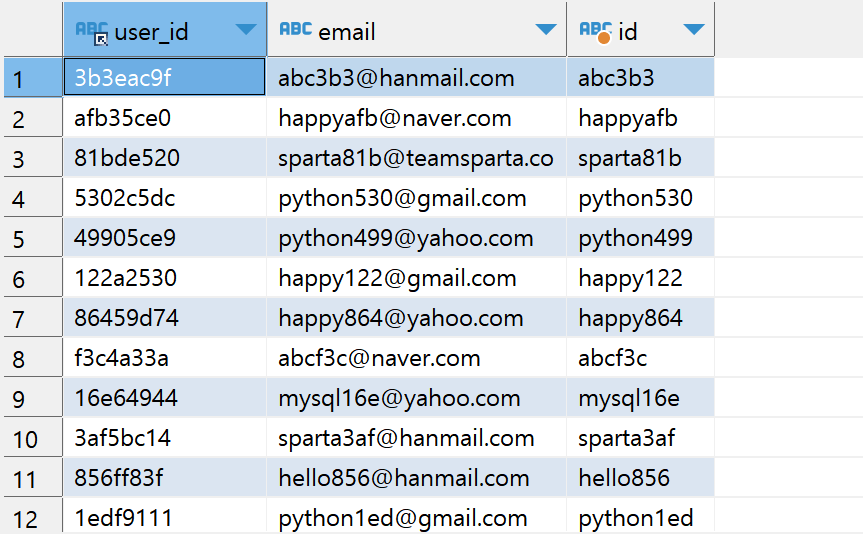
예2) 이메일에서 이메일 도메인만 가져와보기
select user_id, email, SUBSTRING_INDEX(email,'@',-1) from users ;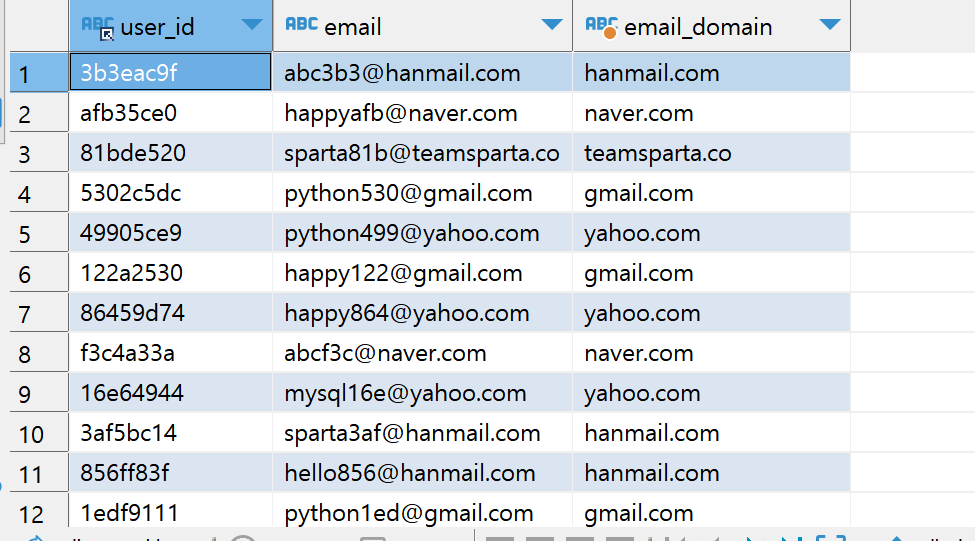
Substring 문법
- 문자열 일부 출력
예1) orders 테이블에서 날짜 출력하고, 일별로 몇 개씩 주문이 일어났는지 알아보기
select SUBSTRING(created_at, 1, 10) as date, count(*) from orders
group by date;

만약에 created_at 에서 시간 데이터를 가지고 오고 싶다면?
select created_at, SUBSTRING(created_at,12,8) from orders;
Case 문법
- 경우에 따라 원하는 값을 새 필드에 출력하기
- case when ~ then~ else~ end
예1) 10000점보다 높은 포인트를 가지고 있으면 '잘 하고 있어요!', 평균보다 낮으면 '조금 더 달려주세요!' 라고 표시해주기
select pu.point_user_id, pu.point,
case
when pu.point > 10000 then '잘 하고 있어요!'
else '조금 더 달려주세요!' END as '구분'
from point_users pu;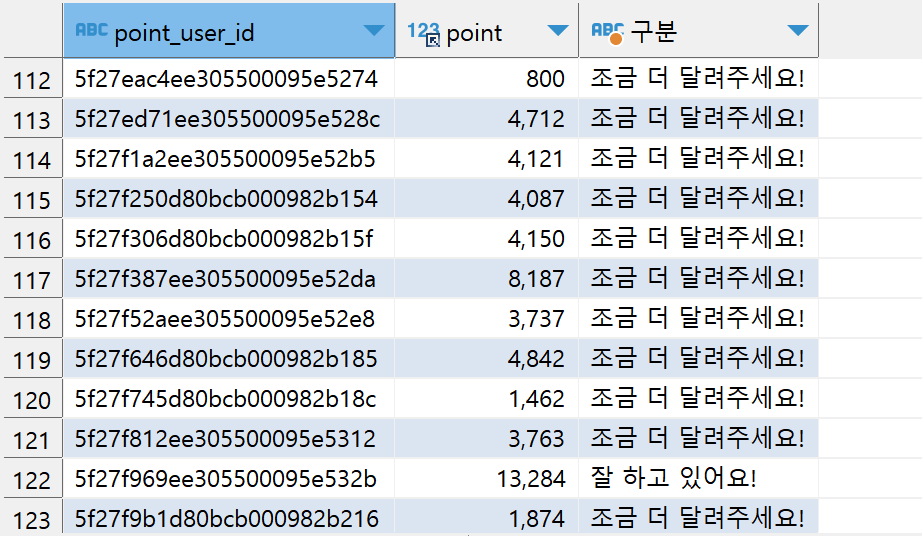
예2) 1만 이상, 5천 이상, 5천 미만 포인트별로 통계내기
with table1 as (
	 select user_id , point,
		  (case when point >=10000 then '1만 이상'
				when point >=5000 then '5천 이상'
				else '5천 미만' end) as lv
				from point_users )
select a. lv, count(*) as cnt from table1 a
group by a.lv;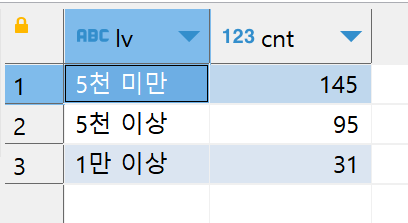
길고 복잡한 쿼리문을 깔끔하게 볼 수 있도록 정리하는 문법들을 배워봤다.
그럼 이제~ 지금까지 배운 내용들을 가지고, 종합 문제를 풀어볼게요!