
| 일 | 월 | 화 | 수 | 목 | 금 | 토 |
|---|---|---|---|---|---|---|
| 1 | 2 | 3 | ||||
| 4 | 5 | 6 | 7 | 8 | 9 | 10 |
| 11 | 12 | 13 | 14 | 15 | 16 | 17 |
| 18 | 19 | 20 | 21 | 22 | 23 | 24 |
| 25 | 26 | 27 | 28 | 29 | 30 | 31 |
Tags
- Git
- 정보처리기사실기
- channels
- js
- Commpot
- 개발일지
- 1주차
- 정보처리기사
- 2주차
- 채팅
- WebSocket
- 알고리즘
- sql
- 프로그래머스
- github
- 가상환경
- 장고
- 마스킹
- re-id
- WIL
- vscode
- 미니프로젝트
- 백준
- REDIS
- Class
- 프로젝트
- poetry
- WHERE절
- resnet50
- 파이썬
Archives
- Today
- Total
개발일기
페이징(pagination) 구현하기 본문
이어서 페이징 구현을 해보자!
아이디어는 다음과 같다.
모든 게시글을 가지고 와서, 한 페이지에 해당하는 게시글 수만큼 보여주고, 다음 페이지로 넘어가자!
구체적으로 코드를 보면서 원리를 살펴보자
먼저 페이징을 구현하기 위해서는 views.py에 Paginator를 import해주어야한다.
from django.core.paginator import Paginator
<post views.py>
def post_view(request):
    category = request.GET.get('category', '')
    subscribe = request.GET.get('subscribed', '')
    all_post = []
    # 카테고리 기능 (카테고리 선택하면 그 카테고리에 있는 글 가져오기)
    if category:
        all_post = Posting.objects.filter(category=category)
    # 구독한 사용자 글 모아보기
    elif subscribe == 'only':
        all_post = Posting.objects.filter(
            author__in=request.user.follow.all())
        pass
    # 여기서부터 페이지
    else:
        all_post = Posting.objects.all()
    all_post = all_post.order_by('-created_at')
    page = int(request.GET.get('page', '1'))
    paginator = Paginator(all_post, 5)
    post_list = paginator.get_page(page)
    return render(request, 'posting/post.html', {'post_list': post_list})
코드 자세히 살펴보기
- request.GET.get('page', 1)
# index로 GET요청이 들어오면 page 파라미터를 읽는다. 없는 경우 1번째 페이지를 default로 셋트한다. - paginator = Paginator(all_post, 5) # 모든 게시글을 5개씩 가져오기
- paginator.get_page(page) # django paginator.py 에서 class Paginator를 보면 다음과 같다.
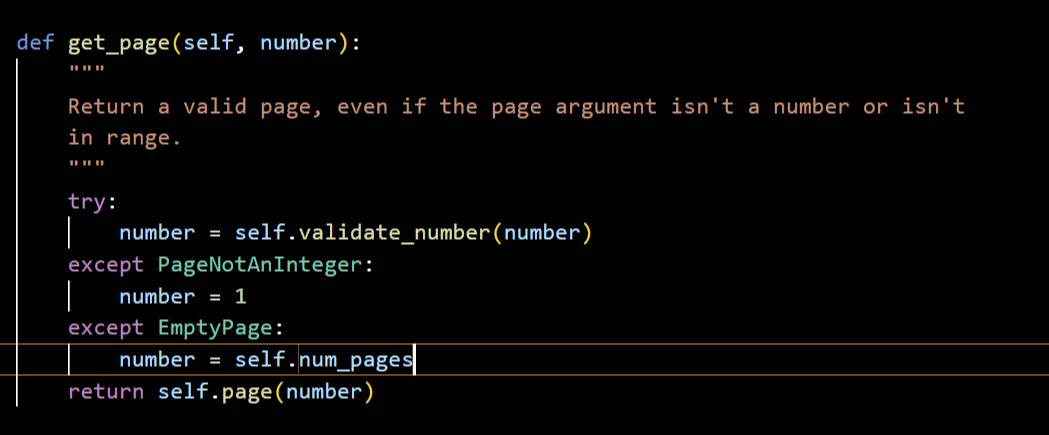
- paginator.get_page(page) 는 class 'django.core.paginator.Page' 를 리턴한다.
- Page 클라스에는 페이징 처리에 필요한 데이터(총 페이징 수, 현재 페이지 등)를 갖고 있다.
- 데이터로는, 'has_next', 'has_previous', 'has_other_pages', 'index', 'next_page_number', 'previous_page_number', 'start_index', 'end_index', 'paginator', 'object_list', 'number', 'paginator' 가 있다.
<post.html>
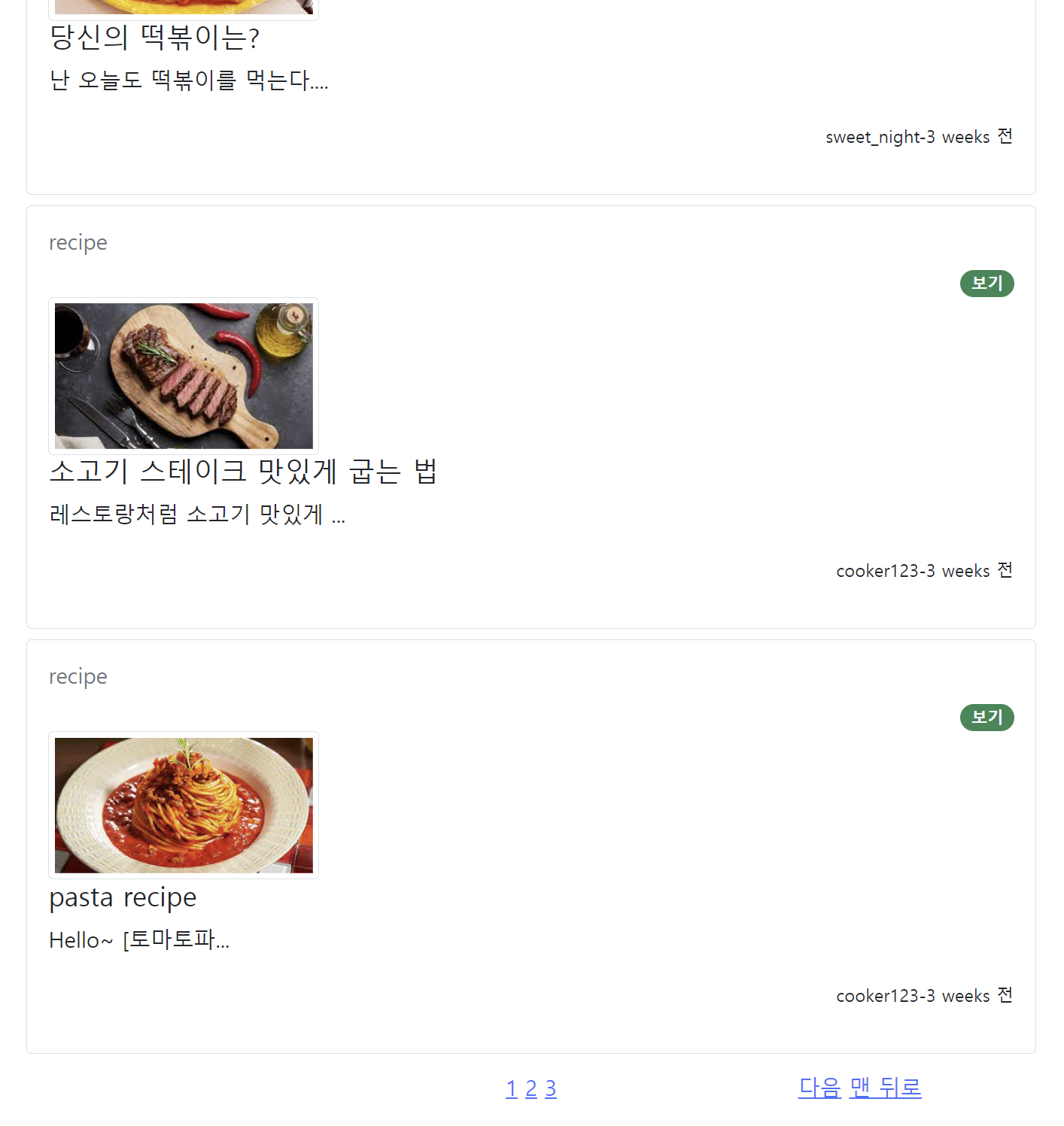
쿼리 파라미터를 사용하여 페이지 기능을 구현했다.
<div style="text-align:center">
    <ul class="pagination">
        <div style="width:35%; margin: 5px;">
            <!--카테고리 & 구독한 사용자 모아보기-->
            {% if post_list.has_previous %}
            <a class="abutton"
                href="?category={{ request.GET.category }}&subscribed={{ request.GET.subscribed }}&page=1">맨
                앞으로</a>
            <a class="abutton"
                href="?category={{ request.GET.category }}&subscribed={{ request.GET.subscribed }}&page={{ post_list.previous_page_number }}">이전</a>
            {% endif %}
        </div>
        <div style="width:30%; margin: 5px;">
            <!--페이지네이션 시작-->
            {% for page in post_list.paginator.page_range %}
            {% if page >= post_list.number|add:-2 and page <= post_list.number|add:2 %}
            <span class="{% if page == post_list.number %}current{% endif %}">
                <a
                    href="?category={{ request.GET.category }}&subscribed={{ request.GET.subscribed }}&page={{ page }}">{{ page }}</a>
            </span>
            {% elif page >= post_list.number|add:-3 and page <= post_list.number|add:3 %}
            ..
            {% endif %}
            {% endfor %}
        </div>
        <div style="width:35%; margin: 5px;">
            {% if post_list.has_next %}
            <a class="abutton"
                href="?category={{ request.GET.category }}&subscribed={{ request.GET.subscribed }}&page={{ post_list.next_page_number }}">다음</a>
            <a class="abutton"
                href="?category={{ request.GET.category }}&subscribed={{ request.GET.subscribed }}&page={{ post_list.paginator.num_pages }}">맨
                뒤로</a>
            {% endif %}
        </div>
    </ul>
</div>
코드 자세히 살펴보기
- {% if page >= post_list.number|add:-2 and page <= post_list.number|add:2 %}
- 현재 페이지를 중심으로 앞 뒤 2개의 페이지 수가 보여진다.
- {% elif page >= post_list.number|add:-3 and page <= post_list.number|add:3 %}
- 현재 페이지를 중심으로 앞 뒤 3개의 페이지는 .. 으로 표시한다.
<RESULT>
'Project Portfolio' 카테고리의 다른 글
| 이름 미정 새로운 프로젝트~ (2) | 2023.05.08 |
|---|---|
| 검색기능 구현하기 (0) | 2023.04.15 |
| 게시글 수정하기 기능(모달과 페이지 두 가지 버전으로 만들기) (0) | 2023.04.13 |
| 게시글 자세히보기/삭제하기/댓글 작성하기/삭제하기 기능 (0) | 2023.04.13 |
| 장고 팀프로젝트 #1 Commpot 기획 (0) | 2023.04.11 |
'Project Portfolio' Related Articles
more


