
| 일 | 월 | 화 | 수 | 목 | 금 | 토 |
|---|---|---|---|---|---|---|
| 1 | 2 | 3 | ||||
| 4 | 5 | 6 | 7 | 8 | 9 | 10 |
| 11 | 12 | 13 | 14 | 15 | 16 | 17 |
| 18 | 19 | 20 | 21 | 22 | 23 | 24 |
| 25 | 26 | 27 | 28 | 29 | 30 | 31 |
- sql
- REDIS
- WebSocket
- Commpot
- channels
- 장고
- 1주차
- github
- 가상환경
- 파이썬
- 개발일지
- 백준
- 미니프로젝트
- WIL
- 알고리즘
- poetry
- Git
- re-id
- vscode
- resnet50
- WHERE절
- Class
- 정보처리기사
- 정보처리기사실기
- 마스킹
- 채팅
- 2주차
- 프로젝트
- 프로그래머스
- js
- Today
- Total
개발일기
테스트코드 작성하기 본문
준비하기
1. test.py 파일 만들기
2. import
from django.urls import reverse
from rest_framework.test import APITestCase
from rest_framework import status
from 모델 import 모델명
3. test앞에는 꼭 test를 써주기! 장고에서는 test가 붙여있어야만 테스트코드라고 인식한다.
4. test.py 실행하는 터미널 명령어는?
# 모든 테스트들을 실행하는 것
python manage.py test :

# Run the specified module
python manage.py test users

python manage.py test catalog.tests

python manage.py test catalog.tests.test_models

# Run the specified class
python manage.py test catalog.tests.test_models.YourTestClass
그럼 이제 몇 가지 예시를 통해 테스트코드를 작성해봅시다!
1. 회원가입 테스트
class UserRegistrationTest(APITestCase):
    def test_registration(self):
        url = reverse("user_view")
        user_data = {
            "email" : "test@testuser.com",
            "password" : "password",
        }
        response = self.client.post(url, user_data)
        # print(response.data)
        self.assertEqual(response.status_code, 201)
reverse를 이용해서 해당하는 url의 name과 연결하고, user_data를 보냅니다!
그랬을 때, 회원가입이 잘 된다면 status_code가 제가 설정한 status_code와 일치하는지 assertEqual을 통해 확인합니다.
제 코드의 경우, 회원가입이 잘 되었을 때에 status_code가 201이 뜨도록 코드를 만들어두었기 때문에,
self.assertEqual(response.status_code, 201) 이렇게 해서 확인을 했습니다.
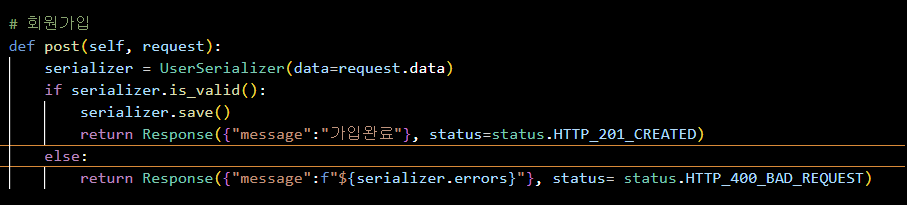
만약 status_code를 설정해두지 않은 상황이라면,
self.assertEqual(response.status_code, 200) 을 하시면 됩니다.
2. 로그인 테스트
class LoginUserTest(APITestCase):
    def setUp(self):
        self.data = {'email':'john@gmail.com', 'password':'johnpassword'}
        self.user = User.objects.create_user('john@gmail.com', 'johnpassword')

    def test_login(self):
        response = self.client.post(reverse('token_obtain_pair'), self.data)
        # print(response.data["access"])
        self.assertEqual(response.status_code, 200)

    def test_get_user_data(self):
        access_token = self.client.post(reverse('token_obtain_pair'), self.data).data['access']
        response = self.client.get(
            path = reverse("user_view"),
            HTTP_AUTHORIZATION = f"Bearer {access_token}"
        )
        # print(response.data)
        self.assertEqual(response.status_code, 200)
        # self.assertEqual(response.data["email"], self.data['email'])
setUp 은 매 테스트가 돌아갈 때마다 함께 돌아갑니다.
setUp을 통해 로그인할 사용자의 데이터를 만듭니다.
로그인을 하기 위해서는 access token이 필요하기 때문에, test_login()을 통해 token을 가지고 옵니다.
그리고 그것을 access_token에 담고, response 데이터를 보냈을 때, status_code가 200이 뜨는지 확인합니다.
200이 뜨면 정상 로그인이 된 것이고, 400번대가 뜨면 로그인이 제대로 되지 않은 것입니다.
status_code가 아니라 다른 데이터로 로그인이 되었는지 확인하고 싶다면,
주석으로 달아둔 것처럼 self.assertEqual(response.data["email"], self.data['email']) 커스터마이징해서 다양하게 테스트코드를 만들 수 있습니다!
setUp 은 매 테스트마다 돌아가는 함수인데, 만약 이를 한 번 만들고 계속 사용하도록 하고 싶다면,
이렇게 할 수 있습니다.
3. 이미지 업로드 테스트코드
이미지 업로드를 테스트하기 위해서는 몇 가지 준비가 필요합니다.
1. Pillow 패키지 설치하기
2. import
from django.test.client import MULTIPART_CONTENT, encode_multipart, BOUNDARY
from PIL import Image
import tempfile
3. 임시이미지파일 만들기
4. 테스트코드 작성하기
@classmethod
    def setUpTestData(cls):
        cls.user_data={"email":"John@gmail.com", "password":"password"}
        cls.article_data = {"title":"title", "content":"content"}
        cls.user = User.objects.create_user('John@gmail.com','password')

def test_create_article_with_image(self):
        # 임시 이미지 파일 생성
        temp_file = tempfile.NamedTemporaryFile()
        temp_file.name = "image.png"
        image_file = get_temporary_image(temp_file)
        image_file.seek(0)

        # article_data에 이미지 넣기
        self.article_data["image"] = image_file

        #전송
        # print(self.article_data)
        # print(type(self.article_data))
        response = self.client.post(
            path=reverse("article_view"),
            data = encode_multipart(data=self.article_data, boundary=BOUNDARY),
            content_type = MULTIPART_CONTENT,
            HTTP_AUTHORIZATION = f"Bearer {self.access_token}"
        )
        self.assertEqual(response.status_code,200)
몇 가지 테스트코드를 작성해보았다.
테스트하고자 하는 부분에 따라 코드는 변할 수 있고,
다양하게 테스트코드를 작성할 수 있다..!!
테스트코드의 종류
- 유닛 테스트: 함수 하나하나와 같이 코드의 작은 부분을 테스트하는 것
- 통합 테스트: 서로 다른 시스템들의 상호작용이 잘 이루어 지는지 테스트하는 것
- 기능 테스트: 사용자와 어플리케이션의 상호작용이 원활하게 이루어지는지 테스트하는 것
참고문서
1. https://github.com/erkarl/django-rest-framework-oauth2-provider-example.git
GitHub - erkarl/django-rest-framework-oauth2-provider-example: Working example of django-rest-framework using OAuth2Authenticati
Working example of django-rest-framework using OAuth2Authentication (django-oauth2-provider) and SessionAuthentication. - GitHub - erkarl/django-rest-framework-oauth2-provider-example: Working exam...
github.com
2. https://tamerlan.dev/how-to-test-drf-apis/
Introduction to Testing in Django and Django Rest Framework
This article will go over the basics of testing and how to write tests for our Django APIs.
tamerlan.dev
3. https://cjwoov.tistory.com/9
[Test] 유닛 테스트(Unit Test), 통합 테스트(Integration Test), 기능 테스트(Functional Test)란?
세 줄 요약 유닛 테스트: 함수 하나하나와 같이 코드의 작은 부분을 테스트하는 것 통합 테스트: 서로 다른 시스템들의 상호작용이 잘 이루어 지는지 테스트하는 것 기능 테스트: 사용자와 어플
cjwoov.tistory.com
'오늘의 공부일기 > 장고 공부일기' 카테고리의 다른 글
| [MySQL] 설치 및 db 생성하기 (0) | 2023.05.24 |
|---|---|
| media & static 파일 다루기 / (staticfiles.E002) The STATICFILES_DIRS setting should not contain the STATIC_ROOT setting 해결하기 (0) | 2023.05.10 |
| Django SECRET_KEY 관리하기 (0) | 2023.04.29 |
| 장고심화 (0) | 2023.04.25 |
| 장고 심화 (0) | 2023.04.24 |
